This post shows Java developers how to capture their Spring Boot engineering standards in a reusable Agent Skill.
Claude Code or GitHub Copilot can then apply those instructions to relevant code-generation tasks, helping the resulting code follow the same conventions consistently.
Define the standards once, and future prompts can benefit from the same guidance without you having to repeat it each time.
Although the process is the focus of this post, you can inspect the generated application and the skill in the repository:
View the generated Spring Boot application on GitHub
Claude and Copilot
I used Claude Code for this example, but the same SKILL.md can also be used with GitHub Copilot.
Claude Code discovers personal skills under:
~/.claude/skills/For GitHub Copilot CLI, personal skills can be stored under:
~/.copilot/skills/How Agent Skills Work
The process is simple: define your engineering standards once, then let the coding agent apply them whenever a relevant prompt is run.
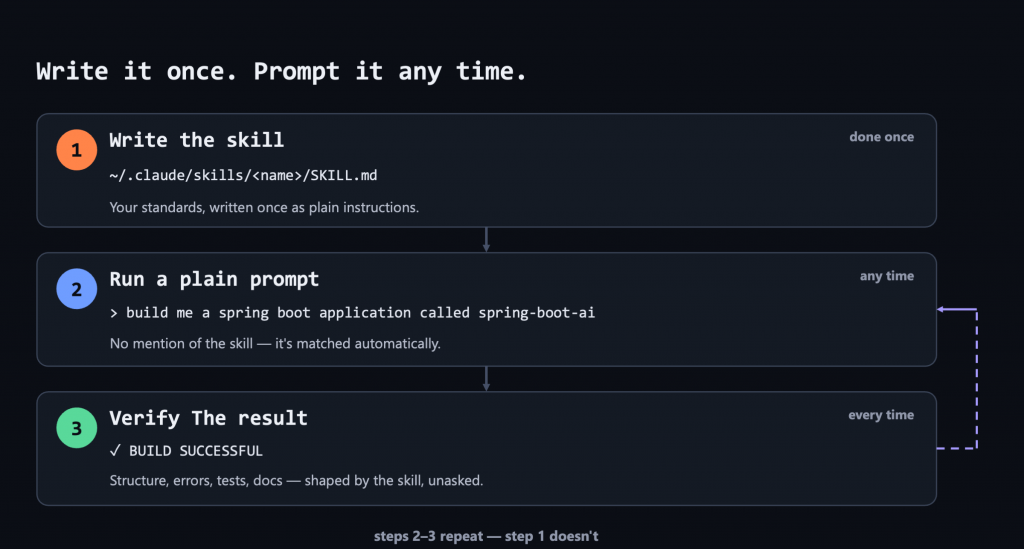
The skill improves the consistency of the generated code. It does not guarantee correctness or replace engineering judgement.
1. Write the skill
Each skill is a directory containing a file named exactly SKILL.md. The capitalisation matters.
For this example, our personal Claude Code skill is stored here:
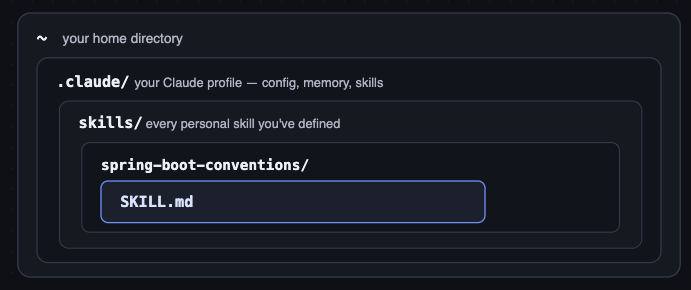
Every SKILL.md begins with YAML frontmatter containing a name and description:
---
name: spring-boot-conventions
description: Apply these conventions when creating or modifying Java Spring Boot applications.
---The description is particularly important because it helps the agent decide when the skill is relevant and should be loaded.
The rest of the file describes your conventions in plain English. It can cover anything you care about: language and build tools, application structure, dependency injection, data access, testing, observability, documentation, Docker and CI/CD.
You do not have to write the first draft manually. You can describe your standards to the coding agent, ask it to create the SKILL.md, and then review and refine the result.
For this deliberately cut-down example, the skill covers the following areas:
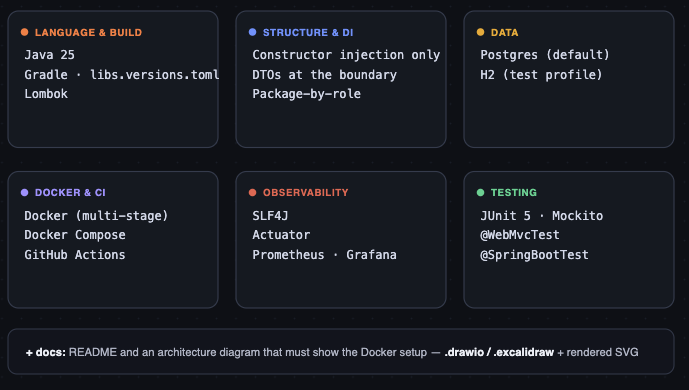
Here’s a snippet – you just describe in plain English. I usually tell the prompt what I want, and have it generate the file.
## Structure & Dependency Injection

- Java 25, Gradle, with dependency versions in a `libs.versions.toml` version catalog rather than scattered in `build.gradle.kts`. Include Lombok.
- Inject dependencies through the constructor. Use `@RequiredArgsConstructor` on `private final` fields. No `@Autowired` fields, no setters.
- Use the right annotation for the job: `@Service`, `@Repository`, `@RestController`, `@Configuration`. Don't just use `@Component` for everything.
- Organize packages by role: `controller`, `service`, `repository`, `model`, `dto`, `exception`, `config`, under `com.johndobie.<app>`.
- Services should be stateless. Don't store per-request data in a service's fields.The complete skill is available here:
View the complete Spring Boot conventions skill
2. Run a prompt
Once the skill exists, you normally do not need to invoke it explicitly. The agent decides when to load it by matching your request against the skill’s description.
You can still mention the skill by name if you want to remove any ambiguity.
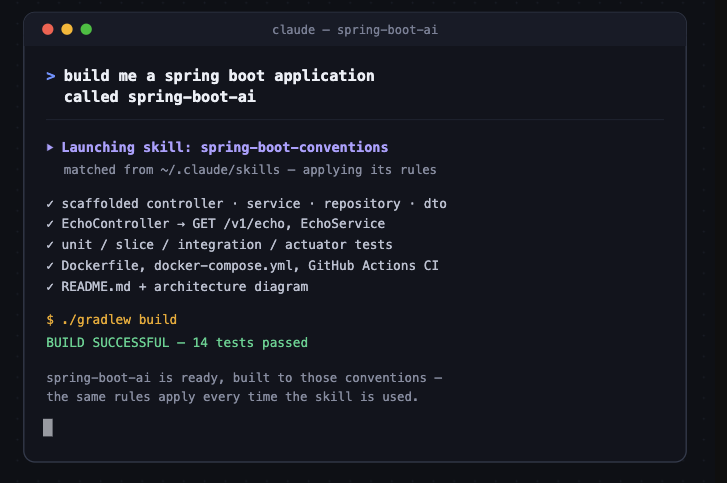
For this demonstration, I deliberately used a minimal prompt:
build me a spring boot application called spring-boot-aiThe prompt is intentionally vague. The skill supplies the engineering conventions; a real application prompt would still need to describe its business requirements.
Claude Code matched the request to the spring-boot-conventions skill and applied its instructions while generating the application.
What did the skill change?
The generated project reflects standards that were defined in the skill rather than repeated in the prompt. It includes:
- Build: Java 25 with a Gradle version catalogue
- Architecture: Constructor injection, DTO boundaries and separated application layers
- Persistence: PostgreSQL with an H2 test profile
- Testing: JUnit 5, Mockito, MockMvc and H2-backed integration tests
- Delivery: Docker, Docker Compose and GitHub Actions
- Observability: Spring Boot Actuator, Prometheus and Grafana
- Documentation: README and architecture diagram
You can inspect the result here:
View the generated application
3. Verify the result
Now treat the result exactly as you would any other contribution:
- Review the generated code and configuration
- Run the build and test suite
- Inspect the dependencies
- Start the application
- Check that the architecture matches the intended design
- Refine anything that does not meet your standards
The skill improves consistency, but it does not replace code review, testing, security checks or engineering judgement.
That is the important point: AI-generated code does not remove engineering responsibility. You can—and should—take ownership of it just as you would code written from scratch.
That’s all, folks! 🐷
Next Steps
This was deliberately a basic example. A real skill can contain much more detailed guidance, examples, templates, reference material and validation scripts.
You can also split your standards into several focused skills that work together. For example:
- Spring Boot application structure
- REST API conventions
- Database and migration standards
- Testing strategy
- Observability
- Docker and deployment
- CI/CD
- Security
This makes the guidance easier to maintain and allows the coding agent to load only the skills relevant to the current task.
People and organisations are already publishing reusable skills. Before importing one, treat it as you would any other code or development tool: review the SKILL.md and inspect any scripts or resources it contains.
References
Anthropic: Agent Skills overview
GitHub: About Agent Skills
GitHub: Adding Agent Skills for GitHub Copilot CLI
GitHub Awesome Copilot: Java Spring Boot skill